Free AI content repurposing tools are not interchangeable. A creator turning a one-hour interview into vertical clips needs a different tool from a newsletter writer adapting a paragraph for several social networks, or a marketing team publishing an existing video to more channels.
The useful question is not “Which tool is best?” but “What do you already have, what must it become, and which restriction will stop your workflow?”
This guide organizes tools by that source-to-output decision. Every product claim below was checked against a current official pricing page, product page, or help document on 2 August 2026.
Where an official source did not clearly establish a free-plan detail, the table says NOT CONFIRMED rather than filling the gap with assumptions.
Practical answer: OpusClip and Vizard document recurring free allowances for long-video clipping. Headliner has a recurring free plan aimed at podcast and video workflows, although its pricing page says the current free video-tool offer is temporary.
Buffer documents a recurring free plan for text repurposing and scheduled distribution. CapCut promotes a free AI clip generator, but its stable allowance, watermark treatment, project retention, and free export limits are not fully documented on the public pages reviewed.
Repurpose.io provides trials rather than a recurring free plan. HubSpot Content Remix requires a qualifying paid subscription.
Choose by what you start with
- Long video to Shorts, Reels, or TikTok clips: compare OpusClip, Vizard, CapCut, and Headliner in Table A.
- Podcast or interview to clips, captions, or text assets: consider Headliner for audio-led workflows, or a video clipper when the source is a recorded interview.
- Blog, newsletter, transcript, or notes to social posts: Buffer is the clearest recurring-free option in this comparison; HubSpot Content Remix is a paid reference point.
- Existing social content to more platforms: Buffer can adapt text and schedule it to connected channels; Repurpose.io can automate media distribution during its trial.
- Existing visual design to platform-specific sizes: a resizing tool may be more appropriate than an AI repurposing tool. Adobe Express offers a free single-image resizer, while automatic resizing of full designs, videos, and templates is a Premium feature.
Readers looking for other creator utilities can also browse the TechReel free AI tools directory. This article stays focused on converting or redistributing content that already exists.
Four jobs that are often mislabeled as content repurposing
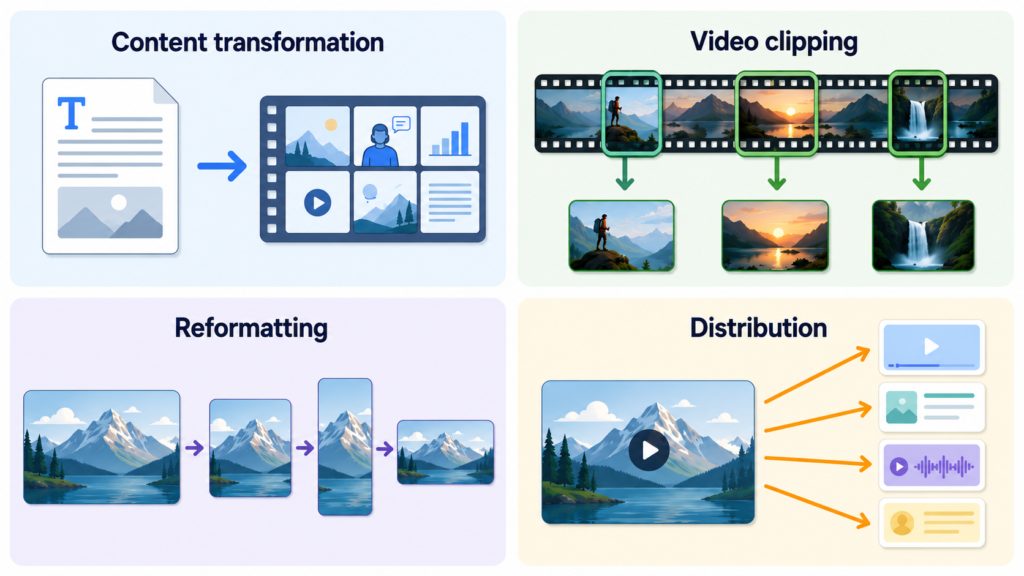
Many comparison pages place four different jobs in one list. Separating them prevents a tool from appearing suitable merely because it uses the word “repurpose.”
- Content transformation creates a genuinely different format, such as turning a transcript into social captions or a podcast into show notes.
- Video clipping extracts shorter moments from longer media. Captions and reframing may be added, but the core content remains an excerpt.
- Reformatting changes dimensions, crop, aspect ratio, or layout while preserving substantially the same asset.
- Distribution publishes an existing asset to additional channels. It may involve minor format conversion, but it does not necessarily create new content.
A single workflow can contain all four jobs. For example, an interview can be clipped, reframed vertically, given a written caption, and distributed to three platforms. The tables below identify which part each product actually performs.
Table A — Long video to short clips
| Product | Recurring free plan or trial | Monthly minutes or credits | Permitted input sources | Clip output | Captions | Reframing | Editing | Watermark | Export resolution | Project expiration | Direct publishing | Signup | Last verified |
|---|---|---|---|---|---|---|---|---|---|---|---|---|---|
| CapCut AI Clip Generator | Official page offers a free version; a stable recurring entitlement is NOT CONFIRMED | NOT CONFIRMED | Local upload or drag-and-drop, CapCut cloud space, Google Drive, Dropbox | Short clips for vertical or social use | AI captions in up to 20 languages | Official page describes subject tracking and social aspect ratios | “Edit more” opens additional editing | AI Clip Generator free-export treatment is NOT CONFIRMED; Pro assets can require Pro for watermark removal | AI Clip Generator free limit is NOT CONFIRMED; some advanced export options are Pro-gated | NOT CONFIRMED | Official marketing mentions sharing, but account-level direct publishing on the free workflow is NOT CONFIRMED | NOT CONFIRMED | 2 Aug 2026 |
| OpusClip | Recurring Free plan | 60 processing minutes / credits per month | YouTube and local files on Free | AI-generated clips up to 1080p | AI captions with emoji and keyword highlighting | Auto reframe included | No editing on Free | Yes | Up to 1080p | Clips stop being exportable after 3 days | No on Free; social posting is listed for Starter | Required | 2 Aug 2026 |
| Vizard | Recurring Free plan | 60 credits per month; 1 credit equals 1 uploaded minute | Official documentation lists local files and links from services including YouTube, Twitch, Zoom, and Google Drive | AI-generated clips; free exports are limited to 10 minutes | Auto subtitling listed | AI clipping and speaker-focused cropping are documented | Full video editor on Free | Yes | 720p | 3 days | One social account can be managed; scheduling is paid, and immediate free publishing is NOT CONFIRMED | Required | 2 Aug 2026 |
| Headliner | Recurring Forever Free plan, but current free video tools are labelled “for a limited time” | Unlimited free video and captioned clips during the temporary offer; 2 hours/month for full-episode transcription and editing | Video uploads up to 10GB, audio files up to 2 hours, and one podcast for auto-created audiograms | Video clips and audiograms; one unwatermarked audiogram/video allowance is documented per month | Captioned clips are included in the temporary free video offer | Automatic framing is documented on Headliner’s official clipping page | Transcribe and edit audio/video for 2 hours per month | One unwatermarked export per month; additional free exports are watermarked | 1080p for videos up to 10 minutes | NOT CONFIRMED | No on Forever Free; auto-posting is listed from Basic | Required; official clipping page states no credit card | 2 Aug 2026 |
CapCut: free clip creation is advertised, but the recurring limits are unclear
CapCut’s official AI Clip Generator page says users can upload a long video, select a preferred highlight duration, generate short clips with captions, continue editing, and export. It lists local, cloud, Google Drive, and Dropbox inputs and captions in up to 20 languages.
The page does not clearly publish a recurring monthly allowance, project-retention period, free export resolution, or a tool-specific watermark rule. CapCut’s separate export help page also explains that Pro-tagged assets, 4K/60fps options, or watermark removal can trigger a subscription prompt. Therefore, those free-plan details remain NOT CONFIRMED for the AI Clip Generator workflow.
OpusClip: documented recurring clipping with tight project retention
The official OpusClip pricing page lists a Free plan at 60 credits per month, rendered clips up to 1080p, automatic reframing, AI captions, a watermark, no editing, and a three-day export window. Its plan documentation describes those credits as 60 processing minutes and limits Free imports to YouTube and local files. Social posting and editing appear under Starter rather than Free.
This makes the free plan suitable only when the creator can review and export promptly. It does not establish that automatically selected clips will perform well, and this article makes no claim about selection accuracy or output quality.
Vizard: recurring minutes plus an editor, with 720p and three-day storage
Vizard’s official pricing page lists 60 credits each month, with one credit charged per uploaded minute. It includes AI-generated clips, a full video editor, 720p export, one managed social account, and three-day storage. The official free-plan help article confirms that exported free-plan videos contain a Vizard watermark and that projects expire after three days.
Vizard documents social account connectivity, while scheduled social posting is listed on a paid tier. Whether the current Free plan can immediately publish every supported output without scheduling is NOT CONFIRMED.
Headliner: podcast-oriented free access with a temporary video offer
Headliner’s official pricing page lists a Forever Free, ad-supported plan with one unwatermarked export per month, additional watermarked exports, 1080p videos up to 10 minutes, one podcast automation, and two hours per month of full-episode transcription and editing. It also lists contextual marketing assets such as show notes, social captions, and keywords.
The same page states that its video tools are free for a limited time. Creators should therefore treat unlimited video and captioned clips as a temporary promotion rather than a guaranteed recurring allowance. Auto-posting to social media and YouTube is listed from the paid Basic tier.
Table B — Text or transcript repurposing
| Product | Accepted source type | Generated written formats | Platform-specific outputs | Export or copy method | Free-use restriction | Account requirement | Published privacy information | Last verified |
|---|---|---|---|---|---|---|---|---|
| Buffer AI Assistant | Pasted prompt or existing text from 4 to 10,000 characters; it cannot read a supplied URL | Post drafts, rephrased, shortened, expanded, more casual, or more formal variations | Channel-aware adaptation in the publishing composer for connected networks | Insert into Buffer’s composer, customize by network, then publish or schedule | Free forever: up to 3 channels, 10 queued posts per channel, 100 stored ideas, 1 user; pricing lists AI Assistant with unlimited credits | Required | Buffer publishes a privacy policy and legal center; AI-specific prompt retention and model-training treatment were NOT CONFIRMED from the help page reviewed | 2 Aug 2026 |
| Headliner | Podcast feed, uploaded audio, or uploaded video that can be transcribed | Pricing lists show notes, social captions, keywords, and other context-aware marketing tools | Exact platform-specific written templates on Forever Free are NOT CONFIRMED | Generation occurs in Headliner; exact free-plan copy/export workflow is NOT CONFIRMED | Two hours/month of full-episode transcription and editing; current video-tool offer is temporary | Required | Published privacy policy is available; product-level AI retention details are NOT CONFIRMED in the pricing source | 2 Aug 2026 |
| HubSpot Content Remix | Existing HubSpot content, text, webpages, and supported audio, video, image, or document files; up to six starting pieces per remix | New assets can include blog content, social posts, images, SMS, and other HubSpot content types | Social generation requires a qualifying Marketing Hub subscription; outputs are created inside HubSpot | Generated assets are reviewed and managed in HubSpot | Not free: Content Hub Professional or Enterprise is required; some output types require additional qualifying subscriptions or add-ons | Paid HubSpot account required | HubSpot publishes legal and privacy documentation | 2 Aug 2026 |
Buffer: recurring-free text adaptation plus a publishing queue
Buffer’s official pricing page lists a Free forever plan with three connected channels, ten scheduled posts per channel, 100 ideas, one user, and AI Assistant. The comparison section describes AI Assistant as a way to refine and repurpose content with unlimited AI credits.
The official AI Assistant help article says a prompt must contain 4 to 10,000 characters. It can regenerate, rephrase, shorten, expand, or change tone, and its composer can adapt text to a selected channel’s limits. It cannot open or read URLs, so a blogger or newsletter writer must paste the relevant source material rather than supply a link. Buffer also advises users to review and fact-check generated suggestions.
HubSpot Content Remix: broad transformation, but not a free option
HubSpot’s official Content Remix documentation supports multiple source types and can generate several kinds of assets. It is included here because it matches the transformation job, not because it satisfies the recurring-free requirement. The documentation requires Content Hub Professional or Enterprise, and generating some destinations—such as social posts or SMS—can require other qualifying subscriptions or add-ons.
Table C — Distribution automation
| Product | Source platforms | Destination platforms | Automatic publishing | Format conversion | Trial versus recurring free access | Account connections required | Important restrictions | Last verified |
|---|---|---|---|---|---|---|---|---|
| Repurpose.io | Official matrix includes TikTok, Instagram, Facebook, Snapchat, YouTube, Google Drive, Dropbox, Twitch, Zoom, Webex, HeyGen, and podcast RSS, with platform-specific source roles | Official matrix includes major social networks plus storage, podcast, and selected commerce/audio destinations, with platform-specific destination roles | Yes during the applicable trial; scheduling and auto-publishing are included | Yes for supported workflows, but the exact media type and source/destination pairing must be checked in the official matrix | Trial only: Standard Trial is 14 days or 10 successful posts; a separate YouTube Trial lasts 90 days | Yes | Standard Trial excludes YouTube as a source and allows one connection per platform. YouTube Trial permits Instagram and TikTok sources with YouTube as the sole destination. Same-platform workflows are not generally supported. | 2 Aug 2026 |
| Buffer | Text entered or adapted in Buffer; connected social accounts | LinkedIn, Threads, Pinterest, Bluesky, YouTube, X, Google Business Profile, Instagram, Mastodon, TikTok, and Facebook are listed on pricing | Yes, within the free queue limit | Text can be customized for each network; this is not automatic media clipping or video conversion | Recurring Free plan | Yes; up to 3 channels | 10 queued posts per channel at one time; slots refill after publishing. AI cannot read source URLs. | 2 Aug 2026 |
| Vizard | Uploaded media and supported links including YouTube, Twitch, Zoom, and Google Drive | Free plan can manage one social account; official help identifies TikTok as the free connection | Scheduled posting is paid; immediate free publishing is NOT CONFIRMED | Long media can be clipped, captioned, reframed, and edited | Recurring Free plan | Yes | 60 uploaded minutes/credits monthly, watermark, 720p output, 10-minute export limit, three-day storage | 2 Aug 2026 |
| Headliner | Podcast feed, audio, and video | Social media and YouTube auto-posting are documented on paid plans | No on Forever Free | Podcast/audio/video can become audiograms, captioned clips, and associated text assets | Recurring Forever Free base; unlimited video tools are currently temporary | One podcast automation is included; broader auto-post connections require paid access | One unwatermarked export per month, then watermarked; 1080p up to 10 minutes; two transcription/editing hours monthly | 2 Aug 2026 |
Repurpose.io: distribution automation, not a recurring-free tool
Repurpose.io is primarily a workflow and distribution product. Its official platform matrix separates source and destination roles and documents the media types accepted for each service. This matters because a platform may be supported only as a source or only as a destination.
The official plan-limit documentation says the Standard Trial ends after 14 days or 10 successful posts, whichever occurs first, and includes auto-publishing and scheduling. It allows one connection of each channel type but excludes YouTube as a source. A separate three-month YouTube Trial allows Instagram and TikTok as sources and YouTube as the only destination. Repurpose.io is therefore useful for testing an automated workflow, but it is not a recurring-free recommendation.
Visual reformatting: use a resizer when the content should stay the same
Not every multi-platform workflow needs AI. Adobe’s official Express image-resizer page lists a free, no-credit-card quick action for JPEG, JPG, PNG, and WebP files under 40MB. It offers preset and custom sizes and can download the resized image or continue editing.
This is reformatting, not content transformation. Adobe’s help documentation states that the broader Resize feature for designs, videos, and templates across multiple formats is available on Premium plans. A free user can resize individual images, but one-click multi-format design resizing should not be treated as a free entitlement.
Source-to-output workflows
Long video to Shorts, Reels, or TikTok clips
- Confirm whether the source is supported: a local file, YouTube URL, cloud file, or another hosted source.
- Estimate the monthly uploaded minutes. OpusClip and Vizard both document 60 recurring minutes/credits, but their export and editing rules differ.
- Check the deadline. Both OpusClip and Vizard document three-day free-project retention, so delayed review can make a project unavailable for export.
- Check the final delivery requirement before processing. A watermark, 720p limit, 1080p limit, or lack of editing may rule out a free plan.
- Review every selected excerpt, caption, crop, and factual statement before publishing. Official feature pages do not prove that automatic selections are accurate or likely to perform well.
Podcast or interview to clips and text assets
- Choose an audio-led tool when the source is a podcast feed or audio file; choose a video clipper when the visual interview is the main asset.
- Separate clip generation from written transformation. An audiogram is a media output, while show notes and social captions are new written assets.
- Check whether the free allowance applies to uploads, transcription, exports, or unwatermarked exports. These are different limits.
- For an ongoing podcast automation, verify whether only one show/feed is allowed and whether auto-posting is a paid feature.
Blog, newsletter, or transcript to social posts
- Paste only the section needed for the post rather than an entire article when the tool has an input limit.
- State the intended network, audience, factual constraints, and call to action.
- Create separate variants for each platform instead of publishing identical copy everywhere.
- Fact-check generated text against the original source. Buffer’s own help documentation warns that AI suggestions can be incorrect or outdated.
- Use the free publishing queue only after checking its connected-channel and scheduled-post limits.
Existing social content to additional platforms
First decide whether the task requires transformation or merely distribution. Buffer can adapt text before scheduling it. Repurpose.io can automate supported media transfers during a trial. A manual upload may remain the simplest option when only one or two additional channels are involved, especially if the automation product has a trial deadline or restrictive platform pairing.
Free-plan checks that matter before choosing
- Recurring allowance: distinguish a monthly reset from a one-time trial or temporary promotion.
- Unit of usage: a “credit” may mean an uploaded minute, a processing minute, an export, or something else.
- Watermark: confirm whether it applies to every free export or only after a monthly unwatermarked allowance.
- Retention: a generated project may remain available for only a few days.
- Editing: clipping does not guarantee timeline editing, caption correction, brand controls, or reframing controls.
- Publishing: connecting an account, publishing immediately, and scheduling automatically are different entitlements.
- Source restrictions: a platform may be a destination but not a source, particularly during a trial.
- Export specification: resolution, duration, aspect ratio, and file format can differ by plan.
Signup, cards, privacy, and commercial use
Most account-based tools in this guide require signup. A free plan does not automatically mean that every workflow is available without entering payment details. Headliner’s official clipping page and Adobe Express’s quick-action page explicitly state that no credit card is required. Repurpose.io’s pricing page also advertises its trial without a credit card. For other products, a universal no-card rule was not established from the official pages reviewed and is therefore NOT CONFIRMED.
Each service publishes general legal or privacy documentation, but a pricing page rarely answers every question about uploaded-media retention, AI prompt handling, model training, or subprocessors. Review the current privacy policy and any AI-specific terms before uploading confidential interviews, unreleased client work, personal data, or licensed media.
Commercial-use rights are NOT CONFIRMED by this comparison. Free access, an export button, or a marketing statement does not establish that the user owns every input, generated element, template, stock asset, font, music track, or output for every commercial purpose. Check the current terms for the exact feature and retain permission for all source content.
How to make the final choice without a subjective ranking
- Write the workflow as source → transformation → destination. Example: “60-minute local MP4 → five captioned vertical clips → manual upload to Shorts and Reels.”
- Remove any product that does not officially support the source.
- Remove any product whose free allowance is smaller than the recurring workload.
- Remove any product whose watermark, resolution, export duration, retention, or editing limits are unacceptable.
- Decide whether direct publishing is necessary or whether manual publishing is safer and easier to verify.
- Run a small, non-confidential sample through the current interface and recheck the plan page before committing a production workflow.
No single free AI content repurposing tool covers every source and destination. OpusClip and Vizard provide the clearest documented recurring allowances for video clipping; Buffer combines recurring-free text adaptation with a limited publishing queue; Headliner addresses podcast-led repurposing but labels its present video offer as temporary. CapCut may fit a clip-first workflow, but several free-plan details remain NOT CONFIRMED. Repurpose.io is a time-limited automation trial, and HubSpot Content Remix is a paid transformation feature.
Verification date: 2 August 2026. Product plans, limits, supported platforms, and terms can change. Recheck the linked official sources before relying on a free workflow.