AI tools cannot guarantee that a freelancer will get clients. Their practical role is narrower: they can help you research suitable prospects, understand a brief, prepare a relevant proposal, present your work clearly, and manage careful follow-up. The final judgment, evidence, personalization, and sending decision still need to come from you.
This guide covers six tools with recurring free access or a limited free allowance. The plan details were checked against official sources on 2 August 2026. Limits and availability can change, so verify the current plan before building a permanent workflow around any tool.
Quick answer: which free AI tools help with client acquisition?
| Tool | Useful stage | Current free-access evidence | Main caution |
|---|---|---|---|
| Perplexity | Prospect and industry research | A free account includes five Pro Searches per day and three file uploads per day | Verify important facts at the original source |
| ChatGPT | Brief analysis and proposal drafting | The Free plan includes search plus limited file uploads and data analysis | Do not upload confidential client information without permission |
| Grammarly | Proposal and email polishing | The Free plan is $0 and includes 100 AI prompts per month | Editing suggestions do not prove factual accuracy |
| Canva | Portfolio pages and proposal visuals | Canva Free is available, with limited access to AI features | The exact free AI allowance is not consistently published and is NOT CONFIRMED |
| Hunter | Company discovery and professional email verification | The Free plan includes 50 credits per month, Discover access, and one connected email account | Follow the outreach and privacy rules that apply to the recipient |
| Upwork Uma | Upwork proposal and profile assistance | Uma is embedded in Upwork and can assist with projects and proposals | Universal free access and exact usage limits are NOT CONFIRMED |
The best starting stack for most freelancers is small: use one research tool, one drafting tool, one editing tool, and the platform-specific tool that matches where you find prospects. Adding more tools rarely fixes a weak service offer or an irrelevant pitch.
1. Perplexity for prospect and industry research
Perplexity’s official account-tier documentation says a free account currently includes five Pro Searches per day, three file uploads per day, Collections, sessions, and Discover. This makes it useful for early research when you need to understand a company, market, or problem before writing a proposal.
A practical use is to ask for a sourced overview of a prospect’s public business model, recent product announcements, target customers, and likely content or operational challenges. Open the cited sources yourself before using any claim in a pitch. Search summaries can omit context, combine outdated information, or misread a source.
Do not upload private client documents merely because file uploads are available. Perplexity states that AI data retention is enabled by default for Free, Pro, and Max users, although an account setting allows future training-data collection to be disabled. Its documentation notes that opting out does not remove information collected before the change. Review the official data-collection settings before using client-related material.
Useful research prompt
Using public and recent sources, summarize this company’s product, target customer, current priorities, and three problems my [specific service] could reasonably help with. Cite every factual claim and separate confirmed facts from inference.
2. ChatGPT for brief analysis and proposal structure
ChatGPT can turn a long job description into a structured checklist, identify missing information, and help draft a proposal outline. The official ChatGPT plan comparison lists search on the Free plan and limited access to file uploads and data analysis. Exact usage limits can vary, so this article does not assign a fixed message or upload quota.
Use it to extract the client’s objective, deliverables, constraints, timeline, required proof, and unanswered questions. Then provide only genuine examples from your own portfolio. AI should never invent clients, years of experience, certifications, project results, testimonials, or tools you have not used.
For personal ChatGPT workspaces, OpenAI provides a setting that stops new conversations from being used to improve its models. The Data Controls documentation explains how to turn off “Improve the model for everyone.” That setting does not replace client permission, a confidentiality agreement, or careful removal of personal and proprietary information.
Useful brief-analysis prompt
Analyze this public job description. Return: the client’s likely objective, required deliverables, explicit constraints, missing questions, and the evidence a qualified freelancer should provide. Do not invent facts about the client or about me.
3. Grammarly for a clearer final proposal
Grammarly is useful after the proposal contains real substance. Its official plan page lists a $0 Free plan with spelling and grammar help, tone information, and 100 AI prompts per month as of the verification date.
Run the final draft through Grammarly to catch mechanical errors, overly long sentences, and a tone that may sound abrupt. Keep control of the message. A polished proposal can still be generic, misleading, or poorly matched to the client. Editing software also cannot verify project claims, prices, deadlines, legal terms, or technical feasibility.
What to check manually after editing
- Every experience and result claim is true and supportable.
- The first paragraph refers to the client’s actual problem.
- The proposed scope matches the listing rather than a reusable template.
- The message contains a specific next step without pressure or false urgency.
- No confidential detail from another client appears in the proposal.
4. Canva for a compact, relevant portfolio
Canva can help freelancers create a one-page case-study layout, selected-work sheet, process diagram, or short proposal presentation. Canva’s pricing page confirms that Canva Free is available, while its AI-access guidance indicates that free users receive a lower AI allowance than paid users.
The exact number of free AI uses is not consistently confirmed in the official material reviewed for this article. Treat the allowance as limited and check your account before planning a high-volume workflow. Many useful portfolio tasks—layout, typography, image placement, and PDF export choices—do not require generative AI.
Use AI features to explore a layout or summarize approved text, not to fabricate client logos, screenshots, testimonials, analytics, or before-and-after results. A simple portfolio containing two relevant, genuine samples is usually more credible than a visually elaborate document filled with unsupported claims.
5. Hunter for targeted external outreach
Hunter is designed for professional email discovery, verification, company research, and outreach. According to Hunter’s Free plan documentation, the current plan includes 50 credits per month, email finding and verification, Discover access, one connected email account, sequences, and open tracking.
Those capabilities should not be treated as permission to send large quantities of generic messages. Use company discovery to build a small list of organisations that genuinely match your service. Verify the business contact, research the recipient’s role, and write a message based on a relevant problem you can actually solve.
Cold-outreach rules depend on the recipient’s country, the type of address, the relationship, and the applicable privacy and marketing laws. Hunter’s own compliance overview stresses that different regulations can apply. This guide is not legal advice. Check the rules that apply to you and your recipients, identify yourself honestly, provide a reasonable way to opt out, and stop contacting people who object.
Useful outreach-draft prompt
Draft a short, one-to-one business email using only the facts below. Mention one verified observation, one relevant service outcome I can support with evidence, and one low-pressure question. Do not add praise, urgency, experience, results, or personal details that I did not provide.
6. Upwork Uma for platform-specific proposal support
Upwork’s official documentation says Uma can help freelancers review, suggest, analyse, and write text, data, and content for Upwork projects and proposals. It can be useful when you want assistance that is already connected to the Upwork workflow.
Access, placement, and usage allowances can vary by account and product rollout. The reviewed official page does not provide a universal free quota, so exact free availability is NOT CONFIRMED. Proposal submission may also require Upwork Connects independently of the AI feature.
Use Uma to improve a manually selected proposal, not to mass-apply. Upwork states that unauthorised bots, scrapers, browser extensions, and third-party services that automatically collect data or perform actions faster than a person can trigger enforcement. Review its automation policy before using any external application tool.
Upwork also restricts sharing contact information before a contract starts, subject to listed exceptions. Keep proposals and pre-contract communication on the platform unless an official exception applies, as explained in its contact-information policy.
A safe seven-step client-acquisition workflow
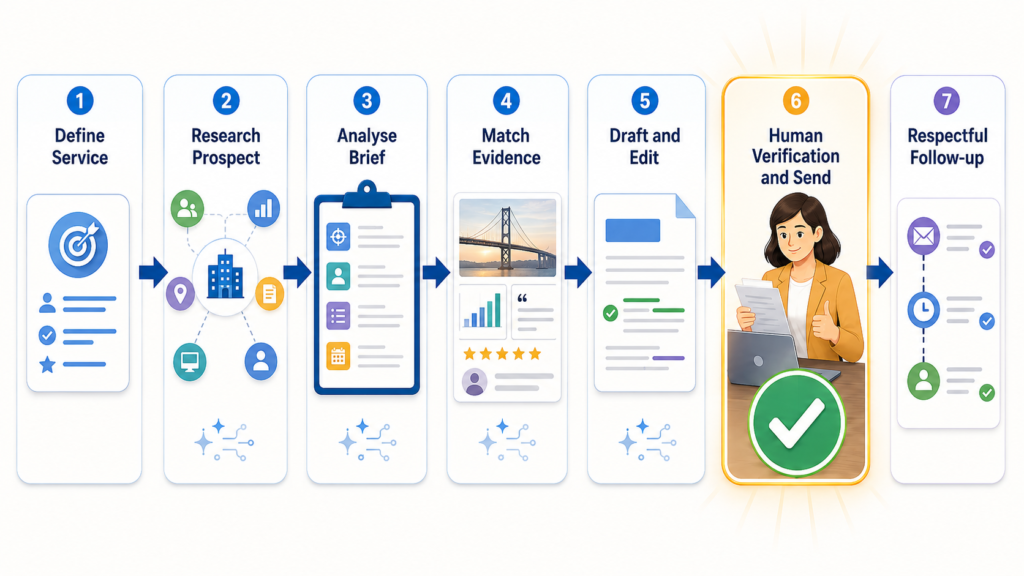
- Define one service. State the problem you solve, the deliverable, the type of client, and the proof you can show.
- Research a small number of suitable prospects. Use public sources and Perplexity to understand the company, then verify the important details yourself.
- Analyse the brief. Use ChatGPT or Uma to separate objectives, deliverables, constraints, and unanswered questions.
- Match genuine evidence. Choose one or two real samples that resemble the requested work. Never create fictional case studies to fill a gap.
- Draft and edit. Prepare a client-specific proposal, then use Grammarly to improve clarity without changing the facts.
- Send through the correct channel. Use Upwork’s own proposal system for Upwork jobs. Use carefully targeted external email only when it is appropriate and compliant.
- Record a reasonable follow-up. Note the date, context, and response. Stop when the recipient opts out or the platform rules require it.
The safe proposal checkpoint
Before sending any AI-assisted proposal or outreach message, confirm all of the following:
- The client, company, role, and project details were verified from a reliable source.
- The proposal addresses a specific need rather than repeating the job description.
- Every portfolio item, skill, credential, testimonial, and result is genuine.
- The scope, timeline, and price reflect your own judgment and capacity.
- No confidential information from another client has been included.
- The contact method follows the marketplace rules and applicable outreach law.
- The message has been read by a person before it is sent.
What these tools cannot do for you
No tool in this list can establish trust on its own. AI cannot replace a clear service, credible samples, realistic pricing, professional communication, or the ability to deliver the work. It also cannot guarantee replies, interviews, contracts, higher rates, or revenue.
Be especially cautious with features that score proposals, predict outcomes, or generate personalised claims. A model may produce confident language without evidence. Use AI to organise and refine information you already have, not to manufacture a stronger professional history.
When a free plan stops being practical
A paid plan may become relevant when a published limit repeatedly blocks real client work, but reaching a limit is not automatically a reason to upgrade. First remove duplicated tools and check whether a simpler manual process works.
| Problem | Before paying, try | Possible upgrade trigger |
|---|---|---|
| Research allowance runs out | Use normal search and primary sources for routine checks | You perform frequent, source-heavy prospect research |
| Drafting limit interrupts proposals | Create a reusable brief-analysis checklist | Verified proposal work regularly exceeds the free allowance |
| Portfolio AI allowance is exhausted | Reuse a clean manual template | You need a documented paid feature for recurring deliverables |
| Email credits are insufficient | Reduce the prospect list and improve targeting | A compliant, measured outreach process has a genuine need for more verification |
Frequently asked questions
Can free AI tools actually get clients?
They can support the work involved in research, proposal preparation, presentation, and follow-up. They cannot guarantee that a prospect will reply or hire you.
Are all six tools completely free?
No. They have recurring free plans, limited free allowances, or platform-included access. Canva’s exact free AI allowance and universal Upwork Uma access were not fully confirmed in the official sources reviewed, so those details are labelled NOT CONFIRMED.
Can I automate Upwork applications?
Do not assume that an automation tool is allowed. Upwork warns that unauthorised tools that collect data or perform actions faster than a person can lead to restrictions or bans. Select jobs and submit proposals manually unless Upwork has explicitly approved the automation you use.
Should I use AI to write every proposal?
No. For a simple, well-matched job, a short message written directly may be faster and more specific. Use AI when it helps you understand complexity or organise genuine evidence, not because every proposal needs generated text.
Can I upload a client brief to a free AI tool?
Only when you have permission and understand the tool’s data controls. Remove personal, confidential, contractual, financial, and proprietary details whenever possible. A consumer opt-out setting is not the same as a contractual confidentiality guarantee.
Final recommendation
Start with Perplexity for public research, ChatGPT for brief analysis, and Grammarly for final editing. Add Canva when you need a compact portfolio, Hunter for carefully targeted external prospecting, or Upwork Uma when you are working inside Upwork. Keep the stack small, verify every claim, and send every message manually.
The strongest advantage is not producing more applications. It is producing fewer, better-matched proposals that contain genuine evidence and respect the recipient’s time, privacy, and platform rules.